Guides
How does AI image generation work? A plain guide to diffusion
AI doesn't cut and paste images from an archive: it starts from random noise and cleans it up step by step. Learn how diffusion works, where your prompt fits in, and what the settings actually change.
Zling AI Team10 min read
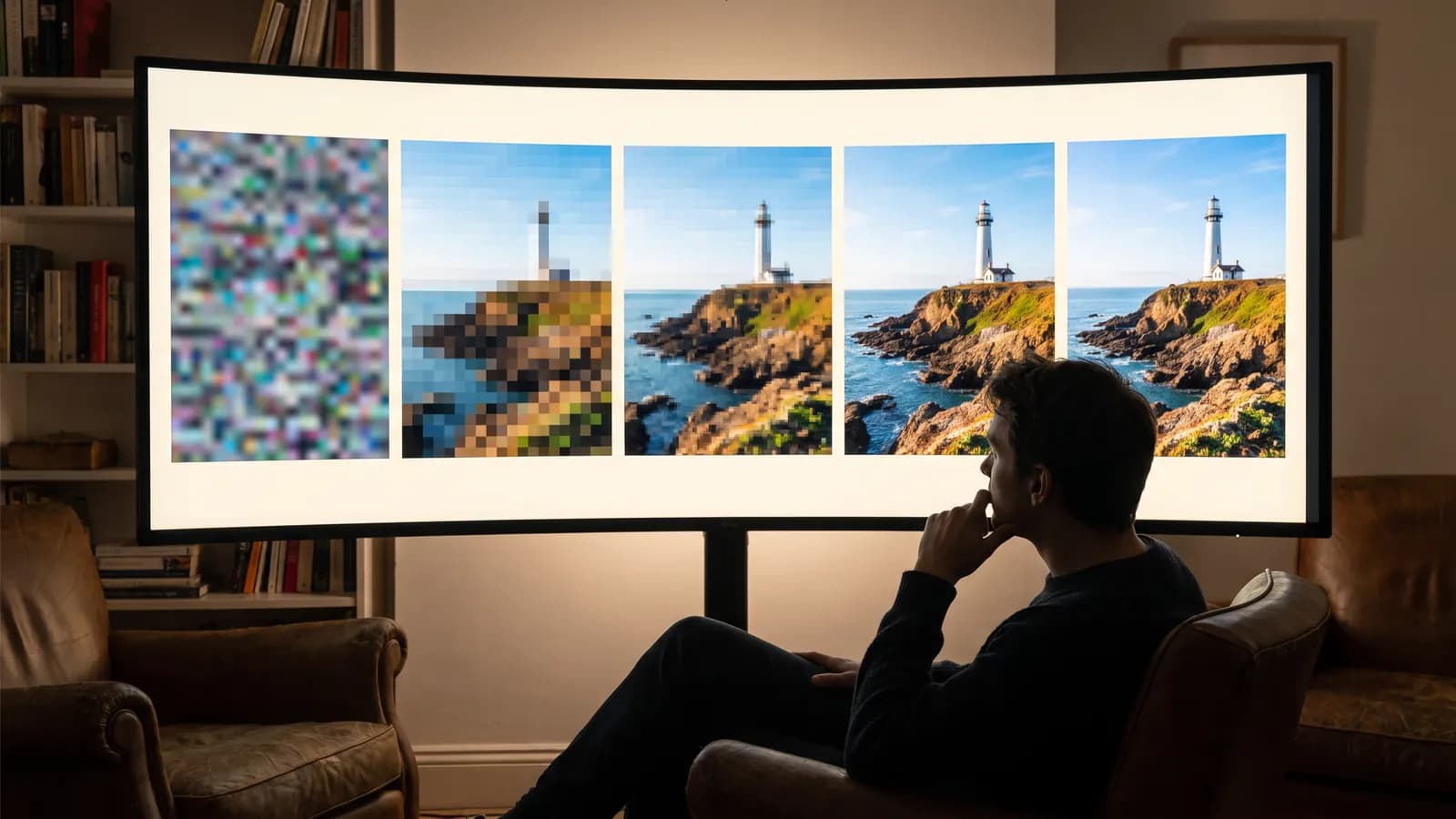
The short answer: most of today's AI image models work with a method called diffusion. The model starts from a screen of random noise, like TV static, and looks at your sentence while it cleans that noise up over dozens of steps; with every step the image gets a little sharper. This guide explains how the process works, where your prompt comes in and what the settings really change, without drowning you in jargon.
How does AI image generation work, in short?
A system that turns text into images is made of three parts working together:
- Text encoder: turns your prompt into a numerical representation the model can work with.
- Denoising network: looks at a noisy image and predicts the noise inside it. This is where the heavy lifting happens.
- Decoder: turns the result the model produced in a compressed space into the pixels you see on screen.
During generation the denoising network works on the same image again and again. On every pass it looks at what the text encoder provided and nudges the image a little closer to your prompt. The result is not a ready-made picture fetched from an archive; it is a new image computed step by step, right then.
What is diffusion? From noise to picture
The idea of diffusion goes back to a 2015 paper by Jascha Sohl-Dickstein and colleagues: define a process that slowly destroys the structure in data, then learn to reverse it. The method stood out for image quality in 2020, with the paper Denoising Diffusion Probabilistic Models (DDPM) by Jonathan Ho, Ajay Jain and Pieter Abbeel.
Training: breaking images and learning to repair them
During training the model is shown real images, but not in their clean form. Random (Gaussian) noise is added to each image in small steps. In the DDPM paper this corruption process was set to 1,000 steps; by the last step almost nothing but pure noise is left. The model's task is surprisingly simple: look at the noisy image at any step and predict the noise that was added. By making this prediction over and over on a very large number of examples, the model indirectly learns what a real image looks like.
Generation: starting from pure noise
When generating an image, the process runs in reverse. The model starts from pure noise, predicts the noise inside it and removes part of it. The slightly more orderly image that results becomes the input of the next step. In the first steps rough patches of colour and the composition appear; in the middle steps shapes settle; in the final steps fine details such as texture, edges and light come into focus. Think of a sculptor who carves the rough outline first and the fine details last.
The model does not cut and paste images from a database; it learns general patterns from the examples it saw in training and computes a new image every time. Researchers have, however, also shown that some images from the training data can be reproduced almost exactly. That is one more reason it is a good habit to avoid prompts that try to copy a well-known artwork or person one to one.
How does the model understand your sentence?
While the noise is being removed, your prompt decides which direction the image takes. To make that possible, the text first goes through a text encoder. One important step here was CLIP, published in 2021: it was trained on 400 million image-text pairs collected from the internet to predict which caption belongs to which image. That brought words and visual concepts into the same numerical space.
The Imagen work by Google researchers shared an interesting finding: using a large language model trained on text alone (T5) as the text encoder works very well, and making that encoder bigger improves quality and text-image alignment more than making the image-generating part bigger. That is one reason newer models understand long, detailed prompts better.
In most models the link between text and image is made by cross-attention layers: at every step, each region of the image works out which words of the prompt it should “look at”. When you write “a woman with a red umbrella”, it is this matching that sends the red to the umbrella. The matching is not perfect, which is why a colour or a property sometimes lands on the wrong object.
Why not work on pixels directly? Latent space
Processing an image pixel by pixel over dozens of steps is very expensive. The Latent Diffusion Models paper (CVPR 2022) by Robin Rombach and team popularised the approach that solves this: first an autoencoder turns the image into a much smaller, compressed representation (a latent); diffusion works on that small representation; at the end the decoder expands the result back into a full-size image.
A concrete example: in the Stable Diffusion pipeline described in Hugging Face's diffusers documentation, a 512×512-pixel image is processed as a 64×64 latent, eight times smaller on each side. That cuts the computing load substantially. Most models you use today build on some variant of this idea.
What do the settings besides the prompt do?
Most settings you see on generation screens directly control one part of the process above. Not every model shows all of them, but knowing what they do makes it easier to read a result and fix it.
| Setting | Part of the process | Practical effect |
|---|---|---|
| Seed | The random noise at the start | The same seed, prompt and settings usually give the same or a very similar result |
| Number of steps | How many denoising passes run | Too few steps leave an unfinished image; past a certain point the difference shrinks and the wait grows |
| Guidance scale (CFG) | How much the prompt weighs at each step | Higher values follow the prompt more strictly and reduce variety; extreme values can look artificial |
| Negative prompt | Concepts the model should move away from | Helps reduce unwanted traits such as “blurry” or “poor details” |
| Strength | How much noise is added in image-to-image | Low values stay faithful to the photo, high values interpret it more freely |
| Aspect ratio | The size of the starting noise | Sets the composition; a vertical frame suits portraits, a horizontal one landscapes |
Why is there a guidance scale?
The Classifier-Free Diffusion Guidance work by Jonathan Ho and Tim Salimans defined the method many models use today. During training the prompt is deliberately left empty from time to time, so the same model learns to predict both with and without a prompt. During generation the difference between the two predictions is amplified, pushing the image towards the prompt. The paper's finding also explains why this setting is a balance: as guidance rises, individual images become more faithful while variety drops. The Imagen paper also notes that very high guidance values can produce oversaturated, unnatural images.
Why does a seed give the same result?
The seed is the starting value of the random number generator that creates the initial noise. The same seed gives the same noise, and the same noise with the same prompt and settings follows the same path. That is why fixing the seed and changing a single word in the prompt is the cleanest way to see what that word does. A small note: as the diffusers documentation also points out, the same seed does not guarantee an identical result on different hardware or software versions.
How does image-to-image work?
When you upload a photo and ask to “turn this into a watercolour painting”, the process does not start from pure noise. The photo itself is converted into latent space, some noise is added to it, and denoising starts from that half-destroyed state. The idea was described in the 2021 SDEdit paper: the more noise you add, the freer the result; the less you add, the more faithful it stays to the photo.
The example in the diffusers documentation puts numbers on it: with 50 steps and a strength of 0.8, 40 steps' worth of noise is added to the photo and then removed over 40 steps. As strength approaches 1.0 the photo is almost entirely ignored. If you want to keep a face, an outfit or a product, start with a low or medium strength; if you want to change the scene completely, raise it.
What has changed in newer models?
The core idea stays the same, but the architecture is changing fast:
- Transformer backbones: early models used a convolutional network called a U-Net. The Diffusion Transformers (DiT) work by William Peebles and Saining Xie showed that a transformer working on latent patches improves consistently with more compute.
- Rectified flow: a 2024 paper by Patrick Esser and team tested, at large scale, the “rectified flow” approach that connects noise and data along a straight line. The authors report that transformer architectures with separate weights for text and image improve prompt understanding and lettering inside images (typography).
- Fewer steps: sampling methods such as DDIM made it possible to draw samples 10 to 50 times faster from the same model, without changing how it was trained. It is one of the pioneers among methods aiming for results in fewer steps.
- Approaches beyond diffusion: not every image model uses diffusion. OpenAI has stated that GPT-4o's native image generation is an autoregressive model, unlike DALL·E, which is a diffusion model.
How does this help you write prompts?
Knowing how diffusion works helps you build your prompt more deliberately. Because the model settles the composition in the early steps and the detail in the late ones, your prompt should describe both the big picture and the details. Try this order:
- Subject: what do you want to see? Pick one main element.
- Setting and light: where, at what time of day, in what kind of light?
- Framing: close-up, wide angle or bird's-eye view?
- Style: photo, watercolour, 3D illustration, vintage film...
- Detail: colour palette, texture, materials.
A weak prompt:
a nice cafe
A stronger prompt:
A small neighbourhood cafe in morning light, a steaming cup of tea by the window, wooden table, warm tones, wide angle, documentary photography style
The second prompt leaves the model less to guess: light, framing and style are set, so guidance pushes in the same direction at every step. If you don't like the result, fix the seed and change one thing at a time: the light first, then the framing. That way you see which word changes what.
Common mistakes
- Contradictory requests: phrases such as “minimal but highly detailed” pull the model in two directions at once.
- Long comma lists: unimportant words dilute the weight of the important ones; write the main idea first.
- Putting negations in the main prompt: many models handle negative sentences poorly, and writing “no hat” can bring a hat to mind. If the model supports it, put this in the negative prompt.
- Changing everything on every try: comparisons made without fixing the seed and settings are misleading.
- Expecting perfect text inside the image: newer models are much better at lettering, but spelling mistakes can still appear in longer text. If you want text in the image, keep it short.
Summary
- Most AI image models work with diffusion: they start from pure noise and clean it up step by step.
- In training the model learns to predict noise; at every generation it computes a new image.
- Your prompt goes through a text encoder and steers the denoising at every step.
- Thanks to latent space, the computation happens on a small representation that is expanded into pixels at the end.
- The seed sets the starting noise, the guidance scale sets the weight of the prompt, and strength sets how faithful image-to-image stays to the photo.
- For good results, spell out subject, light, framing and style, and change only one thing per try.
Frequently asked questions
Do AI image models copy pictures from the internet?
Generally no: the model learns patterns from the examples it saw in training and computes a new image step by step every time. Researchers have, however, shown that some images from the training data (more than a thousand examples, including photos of people and logos) can be reproduced almost exactly. That is one more reason it is a good habit to avoid prompts that copy well-known works or people one to one.
Why do I get a different image every time with the same prompt?
Because every generation starts from different random noise. If you fix the seed, the starting noise is fixed too, and with the same settings you usually get the same or a very similar result; small differences can still appear on different hardware or software versions.
Are more steps always better?
No. Too few steps leave an unfinished image, but past a certain point extra steps make no visible difference and only add time. Sampling methods such as DDIM were developed precisely to get good results in fewer steps.
Should I turn the guidance scale (CFG) all the way up?
Usually not. High values tie the result more tightly to the prompt but reduce variety, and very high values can produce oversaturated, artificial-looking images. Starting from the model's default and changing it in small steps is the safest approach.
How do I keep a face from changing in image-to-image?
Keep the strength setting, which controls how much noise is added to the photo, low, and describe only what you want changed in the prompt. As strength rises, the model interprets the photo more freely and facial features can change.
Sources
- Sohl-Dickstein et al. (2015), Deep Unsupervised Learning using Nonequilibrium Thermodynamics
- Ho, Jain, Abbeel (2020), Denoising Diffusion Probabilistic Models
- Song, Meng, Ermon (2020), Denoising Diffusion Implicit Models
- Radford et al. (2021), Learning Transferable Visual Models From Natural Language Supervision (CLIP)
- Meng et al. (2021), SDEdit: Guided Image Synthesis and Editing with Stochastic Differential Equations
- Rombach et al. (2022), High-Resolution Image Synthesis with Latent Diffusion Models
- Saharia et al. (2022), Photorealistic Text-to-Image Diffusion Models with Deep Language Understanding (Imagen)
- Ho, Salimans (2022), Classifier-Free Diffusion Guidance
- Peebles, Xie (2022), Scalable Diffusion Models with Transformers
- Carlini et al. (2023), Extracting Training Data from Diffusion Models
- Esser et al. (2024), Scaling Rectified Flow Transformers for High-Resolution Image Synthesis
- OpenAI (2025), Addendum to GPT-4o System Card: Native image generation
- Hugging Face Diffusers: Understanding pipelines, models and schedulers
- Hugging Face Diffusers: Image-to-image
- Hugging Face Diffusers: Reproducibility
Related posts
Guides
How does AI video generation work? The idea behind motion
An AI video model does not draw frames one by one; it builds the motion as a whole. We explain how diffusion was extended to time, why clips stay short and how text and photo inputs differ.
7 min read

Guides
AI generation costs: how do credit and token systems work?
AI tools price generation in tokens or credits because every generation is real computation. Resolution, duration and model drive the cost; we also collected ways to spend less.
7 min read
Guides
Browser or app? What to look for when choosing an AI tool
The browser suits detailed work on a big screen, the app suits quick generation from your phone. We explain the differences in screen, uploads, privacy, payments, notifications and offline use.
7 min read