Video
AI product promo video: from storyboard to edit
In a product video the product must look the same in every frame. We cover the storyboard and shot list, image-to-video consistency, adding text in the edit and honesty in advertising.
Zling AI Team7 min read
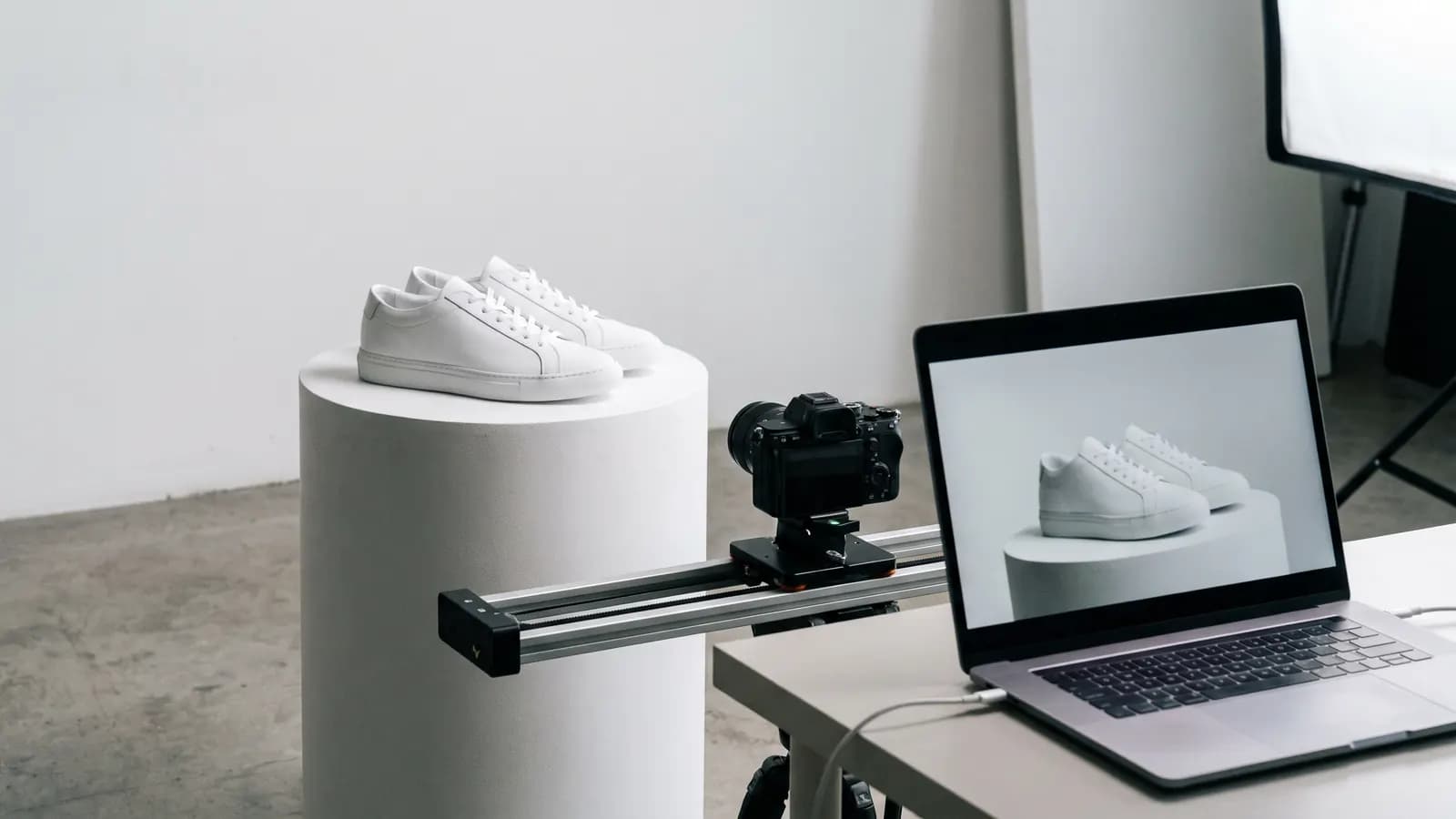
Short answer: an AI product promo video is made by writing a storyboard and a shot list first, preparing a clean image of the product for the start of each shot and producing short clips from those images. Text, logo and price are added later in the edit. The hard part is making the product look the same in every frame and not showing it as something different from what it is. This article explains step by step how a small business can build a product promo video.
What job does AI product video do?
AI does not replace photographing the product itself; it builds a scene that moves around the product: a surface where the light changes, a camera approaching the product, a turning pedestal. For small businesses this can mean a short promo clip without a camera, lighting and location budget. But the quality of the video depends on the quality of the starting images: if the product is not sharp, true in colour and true in proportion in the source image, the video magnifies that.
How do you write a storyboard?
A storyboard is a short list that describes the shots of the video in order. Four or five shots are enough for a 15-30 second product video. Each shot carries one idea:
| Shot | Purpose | Example |
|---|---|---|
| 1. Hook | Grab attention | White sneaker on a pedestal, the light slowly comes on |
| 2. Product | Show the whole thing | The camera slowly circles the sneaker |
| 3. Detail | Highlight a feature | Close-up of the sole texture |
| 4. Use | Give context | The sneaker in a pavement scene |
| 5. Close | A clear ending | Product in the centre, empty space for text |
End each row with a single sentence. Reduce the number of shots: a few good shots beat many weak ones.
How do you prepare a shot list?
The shot list is each shot as a prompt: camera, light, motion, setting. Google Cloud's Veo 3.1 guide suggests a five-part formula: cinematography, subject, action, context and style. Write each shot with these parts:
Slow orbit around white sneakers on a pale-grey pedestal. Soft studio light from the left, gentle shadow on the floor. The shoes stay perfectly still. Clean, minimal, shallow depth of field.
Extreme close-up of the sneaker's rubber sole texture, camera slowly sliding to the right. Soft side light highlights the grooves. Macro lens look.
The guide groups camera language into movement (dolly, tracking, crane, slow pan), composition (wide, close-up, extreme close-up) and lens and focus (shallow depth of field, macro) and gives examples. In product video slow, steady movements are safe: a fast, shaky camera distorts the shape of the product.
How do you keep consistency from image to video?
The biggest risk in product video is the product changing between shots: four stripes in one shot, five in the next, the colour tone drifting, a different logo. The solution: produce each shot not from text but from the real image of the product.
- Prepare a clean product image: Sharp, true in colour, on a plain background.
- Produce a starting frame for each shot: Use an editing prompt that keeps the product exactly and changes the scene. Google's Gemini documentation describes edits such as adding, removing or modifying elements and asking that the other elements are not changed.
- Turn the frames into video: Turn each frame into a short clip; in the prompt describe only the motion and the camera.
- Use reference images: The Veo 3.1 guide recommends providing reference images of a scene, character, object or style to maintain a consistent aesthetic across multiple shots.
- First and last frame: Use the first and last frame feature for a controlled camera move or transformation between two frames.
Using the provided photo, keep the white sneakers exactly as they are: shape, laces, sole and stitching unchanged. Place them on a pale-grey pedestal with soft studio light from the left and a plain pale background.
The guide also suggests timestamped prompts for a multi-shot sequence; you can look at this if you want several shots in a single generation. For product video, though, producing a separate clip per shot is usually more controlled.
When do you add text, logo and price?
Always in the edit, afterwards. Models can break text in motion; if the logo and product name are drawn wrongly, brand trust suffers. In an editing app add:
- Product name and a short slogan (in the close, in the empty space).
- Logo (fixed, small, in a corner).
- Price or campaign information (real and current).
- Music and sound: in line with the platform's music licensing rules.
- Captions: for people watching without sound.
Plan an empty area from the start: in the closing shot leave room for text above or below the product.
What does staying honest in advertising mean?
The problem starts when AI video is used to make the product look better than it is. Simple rules:
- Keep the product the same: Colour, size, material and features should match reality. Do not imply a feature the product does not have (water resistance, shine) visually.
- If the scene is not part of the product, say so: If an accessory or location in the video is not in the product package, say so in the description.
- Back claims with evidence: Have a basis in advance for phrases like "the most durable" or "twice as light".
- Do not create a fake customer impression: An AI-generated "customer review" or usage scene that looks like a real person can be misleading.
The FTC's small-business guide says ads must be truthful and not misleading; that express claims, implied claims and omissions are all covered; and that claims need a reasonable basis before the ad runs. The guide also asks for disclosure of material connections in endorsements. This is not legal advice, but the practical conclusion is clear: an AI video is also an advertisement and advertising rules apply.
For labelling, look at platform rules. For example YouTube's help page asks for disclosure of content that looks realistic and alters footage of a real event or place or generates a realistic scene that did not occur, while exempting minor aesthetic edits such as colour and lighting correction and production assistance such as idea or script generation. If your product promo generates a realistic scene that never happened, disclosing is the safest route.
Which products need extra care?
- Glossy and reflective products (glass, metal): Reflections change as the camera moves; the model may take a reflection for part of the product. Choose slow movements that keep the light steady.
- Transparent products: Edges break easily because the background shows through the product.
- Packaging with text: The label can break while it moves; use critical text from the real photo and keep the shot short.
- Wearable products: The fall of the fabric and the stitching are guessed; compare with the real product photo.
- Food and drink: Steam and flow look impressive, but do not promise a texture the real product does not have.
The test is simple: when the customer takes the product from the courier, can they say "that's the one"?
Step-by-step workflow
- Prepare a clean, sharp image of the product.
- Write a 4-5 shot storyboard; each shot one idea.
- Produce a starting frame for each shot; keep the product exactly.
- Turn the frames into short clips; slow, single movement.
- In every clip compare the product with the real one: shape, colour, logo.
- In the edit order the clips; add text, logo, price, music.
- Review the claims and the label; publish.
Common mistakes
- Generating the product from text: Without a real image the product changes between shots.
- A camera that is too fast: The shape distorts.
- Having the AI generate text: Letters and logo can break.
- Many shots, short time: A few good shots are more effective.
- Showing the product better than it is: Returns and loss of trust.
- Not seeking evidence for claims: Phrases like "the best" need proof.
Summary
- Start with a storyboard and shot list; each shot one idea.
- Produce shots from the real image of the product; keep the product exactly.
- Produce short clips with slow, single movement; add text, logo and price in the edit.
- Compare the product with reality in every clip.
- Advertising rules apply: show honestly, find evidence for claims, label according to platform rules.
Frequently asked questions
How many shots are enough for an AI product video?
For a 15-30 second video four or five shots are enough: hook, product, detail, use and close. Each shot should carry one idea; a few good shots beat many weak ones.
What if the product changes between shots?
Produce the shots not from text but from the real image of the product. The Veo 3.1 guide recommends reference images for a consistent aesthetic across multiple shots. Compare each clip with the real product.
Should I have the AI generate text and the logo?
No. Models can break text and logos while they move. Add the product name, logo, price and captions afterwards in an editing app.
Can an AI product video count as a misleading ad?
If it shows the product as something different from what it is and that could affect a purchase decision, it can be. The FTC's small-business guide says ads must be truthful and claims need a reasonable basis before they run. This is not legal advice.
Should I label an advertising video made with AI?
It depends on the platform. YouTube asks for disclosure of content that generates a realistic scene that did not occur or alters footage of a real event; minor aesthetic edits are exempt. Read the rules of the platform you upload to.
Sources
Related posts
Video
Photo to video: giving motion to a still image
A good frame, one motion and one camera move are enough to turn a photo into a video. We explain how to pick the photo, write prompts, set the duration and prevent common artefacts.
7 min read
Video
AI video for Reels, TikTok and Shorts: a vertical format guide
In short-form video the first second, a vertical frame and clean pacing decide everything. We cover the 9:16 format, duration and pacing, the hook, safe areas and AI labelling rules.
7 min read
Guides
How does AI image generation work? A plain guide to diffusion
AI doesn't cut and paste images from an archive: it starts from random noise and cleans it up step by step. Learn how diffusion works, where your prompt fits in, and what the settings actually change.
10 min read